
On this page
- How to use AI for UX Research
- 🧠 Planning
- 🧑🤝🧑 Recruiting
- 🎙️ Data collection
- 🧩 Analysis & synthesis
- 📣 Knowledge sharing
- Agentic research: MCP and Claude skills
- Quality, governance, and keeping humans in the loop
- Get started (without getting overwhelmed)
- 🧰 Want a head start?
- 🧪 Play with LLMs yourself
- What to read next
Do you remember where you were on November 30th, 2022?
Although the field of Artificial Intelligence (AI) dates back to the mid-20th century, it was on this day just a few years ago that AI burst into the public consciousness with OpenAI’s release of ChatGPT. It took just two months to reach 100 million users, making it the fastest growing product ever, and paving the way to *waves hands around* all of this.
Since then, we’ve seen an unfathomable amount of hype, panic, and change:
- Venture capital is pouring into AI: The top three AI companies (Open AI, xAI, and Anthropic) have collectively raised $65 billion, nearly one-third of venture dollars in 2025 so far.
- Everyone and their mother is weaving AI into their product roadmaps: By our count, all but five tools purpose-built for UX research have publicly released some type of AI feature so far (more on this in our downloadable AI tool comparison guide).
- AI-native products are springing up, promising to completely reinvent work, research included: By our count, over 20 new AI-first, user research-specific SaaS companies have launched since the release of ChatGPT.
While reality hasn’t matched many of the lofty promises made (yet), things are starting to shift. In the past six months both the capabilities of AI models as well as their ability to act on our behalf and interoperate with other tools has exploded. And the UX Research community has taken notice. Last year, UXRConf 2024 had one talk about AI. This year, Research Week dedicated half a day to AI, and many sessions at UXRConf and the Research Leadership Summit centered around AI.
AI won’t take our jobs as Researchers, unless we fail to examine when and how AI can help us do our jobs better, the same way we have with other advancements in technology. This five-part series on AI in Research is designed to help you do that, whether:
- You’re skeptical about AI and want someone to convince you otherwise
- You’re afraid of AI and want to know what’s real vs. hype
- You want to get started but you don’t know how
- You’re already excited about/playing with AI and want to explore what others are doing
Let’s dive in.
(Oh, and make sure to grab our 2026 AI x UXR Tool Comparison Guide so you can follow along with who’s building what.)
Get the 2026 AI x UXR Tool Comparison Guide
How to use AI for UX Research
While the extent may vary by organization and industry, many are starting to weave AI into every piece of their operations. Research is no different. Here are some of the ways myself and other Researchers have been using AI to increase efficiency, throughput, and quality, surfacing new capabilities.
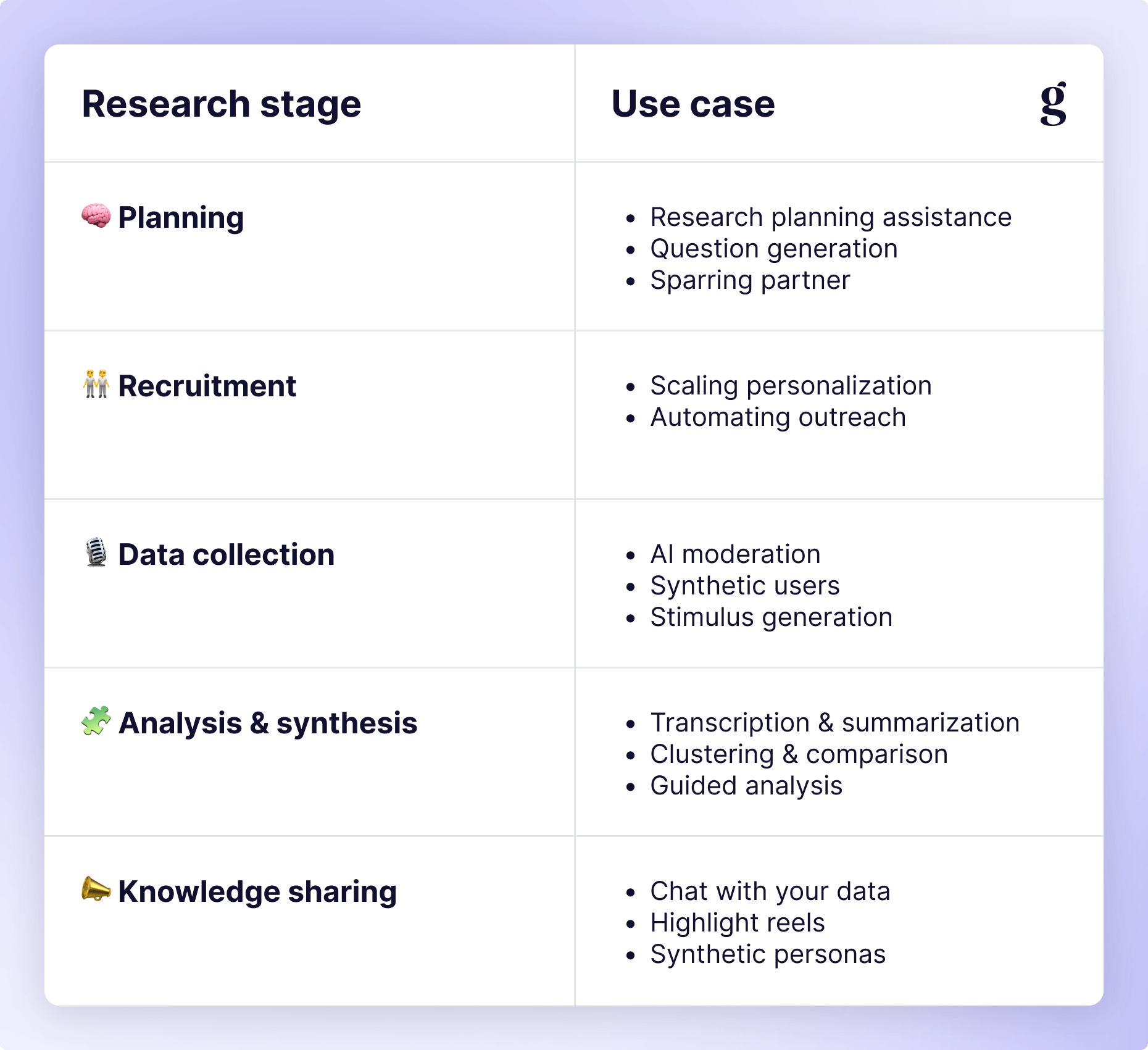
🧠 Planning
Research planning assistance
We’ve all been there: the dreaded “blank page problem.” Sometimes the hardest part is getting started. When there are a nearly infinite number of things you could be researching or ways you could be approaching the problem, how do you know you’re on the right track?
Instead of staring at a blank doc or pasting a research plan template for the hundredth time (swipe mine below if you like), feed whatever inputs you have (Jira tickets, Product Requirements Docs, design mockups, your research objectives, whatever) into your favorite LLM. Ask it to help you:
- Figure out what your research goals are/should be
- Draft key questions and target users
- Select your methodology (or methodologies)
- Build a project timeline based on the above
- Set up your participant recruitment funnel
- …and more (seriously, try anything)
It’s not about generating a flawless, production-ready plan. Your main goal is speed: get something that’s 80% of the way there in five minutes so you can spend your time iterating and refining.
Get Brad's Research Plan Template
Question generation
Once you have a plan, another place researchers can get stuck is figuring out what questions to ask or how to ask them. Here is another area where AI excels because it enables an interactive experience where you can ask it to rephrase questions, take different perspectives, or elaborate on certain areas.
Try asking it to write five questions for each of your research goals and see what it comes up with. Then ask it to do it again from the perspective of your CEO or a new teammate with little to no background context. Ask it to make questions longer or shorter. If you’re working on a survey, ask it to use different question types (e.g. multiselect, matrix, linear scales). If you’re working on an interview, make sure you balance how many follow-up questions it asks (more on this later).
Again, the goal isn’t to get something to hand off right away. A key tenet of using AI is that you’re still responsible for the quality of your work. Your goal is to get past the tedious part faster and get to something that’s at least good enough to react to.
Sparring partner
Asking AI to critique your work might be my favorite use case so far. Similar to asking it to take different perspectives when generating questions, you can ask AI to look for biases, blind spots, or imbalances in your approach. Ask it to think about how different types of users might react to the questions (a la “synthetic users” 🤫).
You can do this at any point in your research process, which is incredibly handy when preparing findings and putting a presentation together. Does your narrative flow smoothly? How might your Sales team react to this compared to Marketing or Product? What might your PM think? Your designer?
Using an AI as a sparring partner is like having an army of tireless (junior) teammates whose sole purpose is to poke holes in your thinking.
🧑🤝🧑 Recruiting
Participant recruitment is the ultimate research bottleneck. (My previous ReOps Lead once quoted me saying, “Recruiting is the worst. Everyone hates recruiting” 😅). From writing a screener all the way through sending reminders, AI can help here as well.
Scaling personalization
Your typical recruiting process looks something like this:
- You scan through all eligible participants to see who might be a good fit.
- You send emails to each of those people asking them to fill out your screener.
- You receive form submissions and select those that you’d like to interview.
- You email them again, inviting them to participate.
- Participants either respond to your email with their availability or sign up for existing time slots via Calendly or your recruiting tool.
- You (or your tool of choice) send reminders to participants about their upcoming session.
- Participants show up (or don’t 🙊) and you conduct your research session.
- Afterwards, another email is sent with a thank you note and any reward they’re eligible for.
The state of the art for most teams is to use a participant management tool (e.g. Great Question, Rally, or User Interviews) which can make this more efficient. If you have it all configured properly, your panel is in the tool, you have email templates set up, and it can automate most of the screening, reminders, and incentives for you.
While this is great and all, I anticipate this becoming even more effective soon. With AI, you should be able to have it scan the entire database for candidates that might be a good fit, send them personalized outreach emails based on past experience or available metadata, provide scheduling options, and follow up with personalized reminders. I’m imagining a world where a system is intelligent enough to send a thank you and reward email once a session is confirmed to be completed (e.g. by looking at the length of the recording, or the transcript) without a Researcher or ReOps teammate needing to log into the tool just to click a button.
This may seem futuristic, but it’s something AI is capable of right now (though it takes a lot of manual work on your part). You can put a CSV into ChatGPT and ask it to select candidates based on your criteria and write personalized outreach emails for each of them. If you want to take it a step further, let’s talk about automation.
Automating outreach
Once you’re comfortable with the quality of the output from the above workflow, you can start to automate the process with a little extra work. Because research tools currently don’t support end-to-end automation, you might have to get your hands a little dirtier than usual in terms of technology. Using platforms like Zapier, n8n, Gumloop, or Make can help you create agents (usually via MCP) to handle all of this for you. The initial outreach, the scheduling email (which, if an AI is handling it, could be completely conversational instead of forcing participants to pick from existing time slots), the reminders, and the reward. All personalized. All automated.
You can even go one step further and have the agent troubleshoot participant interactions, answering FAQs from participants, providing additional instructions in the reminder email (e.g. to be in a quiet place with stable internet), and flagging anything unusual for human review. In an ideal world, your participant management tool can provide a completely prompt-based experience for all of this. Imagine something like:
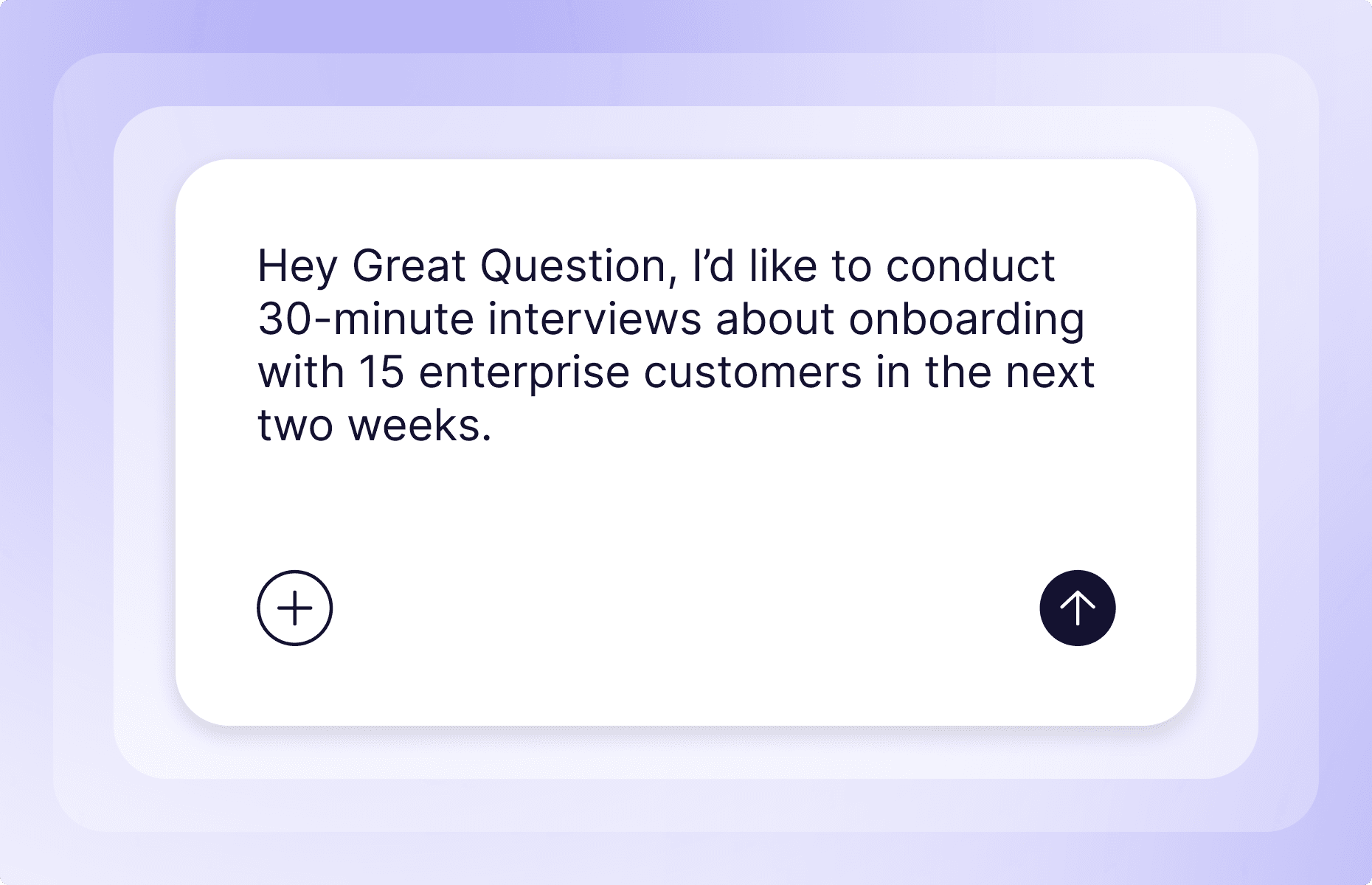
And next thing you know, events start popping up on your calendar. How much more research could your team do if recruiting was this effortless?
🎙️ Data collection
The first wave of AI in research tooling was all about synthesis and analysis. Now it’s all about AI-moderated interviews. While that opens new and interesting doors for us, it’s not the only way it can help us in the data collection step of the process.
AI moderation
The UX Researchers Guild recently ran an Intro to AI Moderation session that walks you through the basics of AI moderation. In a nutshell, you give the agent a script (or it generates its own) just like you would give to a researcher, including what to follow up on and how deeply. From there, the rest of the process plays out like it would with a human: there’s outreach to participants, they’re screened in, and they conduct their session. The difference is that it’s an AI moderator instead of a human.
“It’s not a shortcut to knowledge. These tools are not a shortcut to you doing your job well as a researcher, to really fully internalizing and embodying what you learn with your work.”

Source
UX Researchers’ Guild | AI Club - July 2025: Getting Started with AI-Moderated Interviews
Other potential benefits of AI moderation include:
- Participants can do it on their own time instead of having to work around your schedule
- Oftentimes they can do it in a language that might not be available (English is the language of most tech companies and translation is difficult and expensive)
- And, if you believe the vendor hype, you can get qualitative insights at a quantitative scale
Still, we can’t think of it as a complete replacement for a synchronous human interview (doubly so for in-person sessions). As it stands today, there are just as many drawbacks as benefits. Interactions are usually pretty clunky, as participants often need to press a button to speak instead of being able to just talk like they would on a video call. Some platforms have a fully voice-enabled experience where the moderator talks to you, but most rely on text prompts with the option of text, audio, or video responses, creating a segmented experience both for the participant and for you as a reviewer. I’ve also seen high levels of fraud on these platforms, as it’s more difficult to detect if someone is answering your questions or if they’re using an LLM to generate their responses.
The promise of “qual at quant scale” is also a little misleading. Don’t think about AI moderation like you would human moderation. Instead, think of it like a smarter survey that’s able to ask follow-up questions and do some thematic analysis of data for you. Maybe someday we’ll have something more like human moderation, but for now, I’m shifting my terminology away from “moderated/unmoderated/AI-moderated” toward “synchronous/asynchronous” when describing data collection.
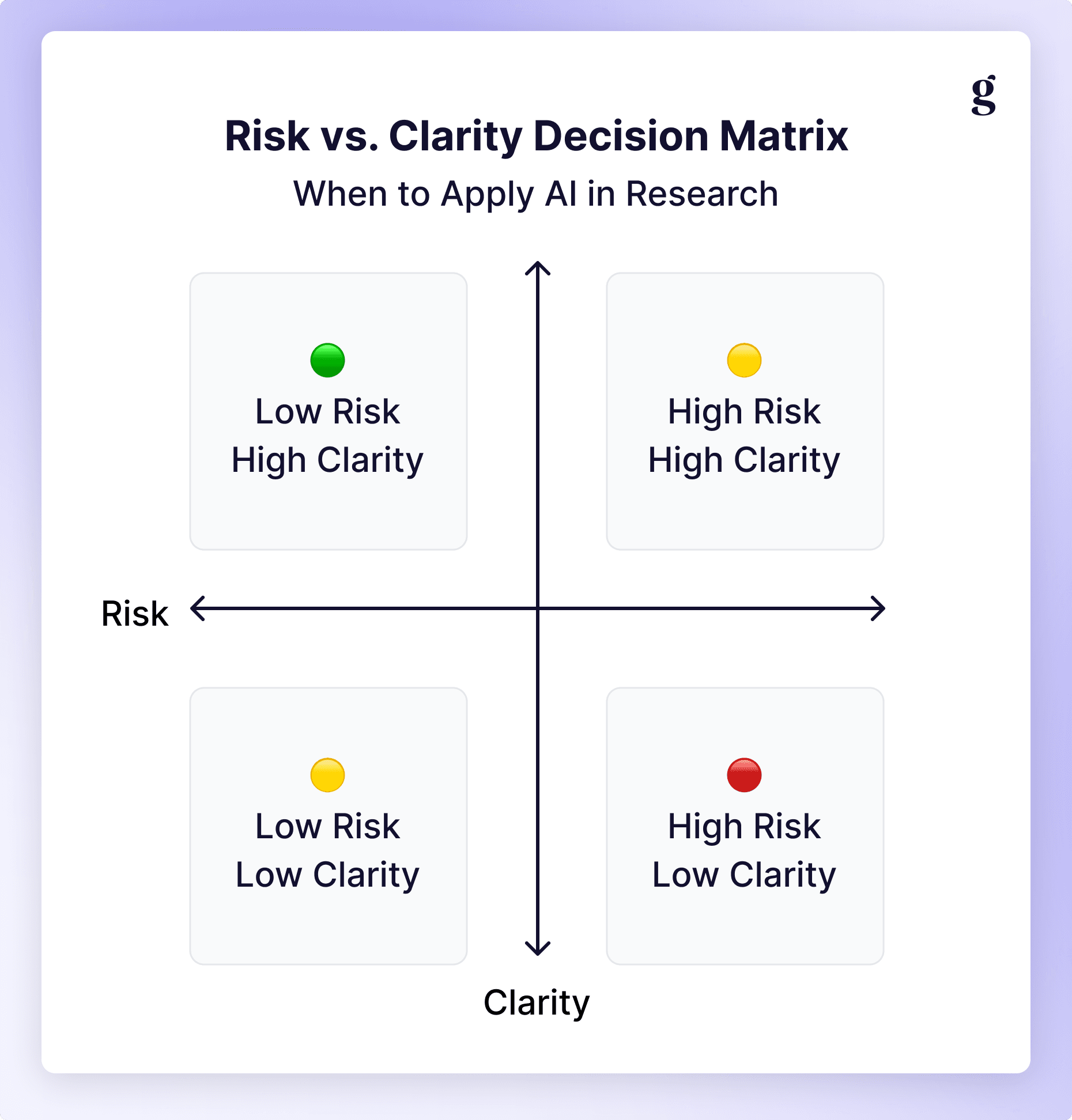
Synthetic users
When the company Synthetic Users first started making waves, there was an uproar in the UX community. Despite what their marketing may tell you, you can’t fully replace human users with AI in Research. However, there are some interesting use cases in planning, data gathering, and even knowledge sharing.
It’s crucial to give your LLM enough context about your users (ideally trained on your real data), but you can use synthetic users to strengthen your overall research design and approach. Ask AI to assume the role of different types of users to gauge how they might react to different questions, prompts, or mockups. You can’t use this as a replacement for research, but it’s a great way to prepare yourself for the real thing, especially with complex domains, hard-to-reach audiences, or sensitive topics.
Stimulus generation
This is possibly the most interesting and novel application of AI I’ve seen come out of the Research community so far. Researchers Jane Leibrock from Anthropic, Jennifer Maples from AirBnB, and Molly Needelman from Google are experimenting with new ways to generate stimuli for research sessions. The old way of working is to have your design team create several static (though ideally clickable) mockups that each participant interacts with, explaining what they would do. This “Wizard of Oz” approach has been the state of the art for approximately 50 years 😳. In 2025 and beyond, we can do better.
Something interesting that’s caught my attention is the divergence in fidelity: some go high, others go low. Instead of the same static mockups for each participant, teams are experimenting with personalized prototypes that make the experience feel more real. You can go a step further and vibe code prototypes, so you can test interactions without the need for engineering or any backend support. Now each session can get into rich detail of how a product or feature might work for their world. Molly’s “Build to Learn” talk at UXRConf went as far as to include co-creation with your users, allowing them to build something best suited for them in-session.
“We’ve been on a journey together learning how we can increase the speed of our research from long cycles to quick loops, how we can empower researchers to get hands-on and make their insights tangible moving from waiting to making, and how we can increase the relevance of our research stimuli by moving from generic mocks to personal artifacts. We’ve seen how many of the different constraints that have defined our practice are dissolving. We have the unprecedented opportunity not just to observe the future but to actively shape it.”

On the opposite end of the spectrum, AI can be used for a visioning exercise with your participants. Brainstorm different feature sets or potential solutions to the problems you’ve uncovered from research, then train a custom GPT to write stories about your users describing how these different features have helped solve their problems. You can even ask it to create low-fidelity mockups. Once you have an agent trained to your liking, you can feed notes from your interview with a participant in and generate personalized stories on the fly, asking users to read and react to these new stimuli.
🧩 Analysis & synthesis
Analysis and synthesis is the first place most people start with AI, and in some ways it’s also the strongest use case. Things get complicated when the context window gets too large (you’re probably safe for individual studies but once you get into multiple studies/large sample sizes, all but the newest and most capable models struggle), but given transcription is one of the earliest uses of AI (that often doesn’t even get recognized as AI by modern standards), it’s no surprise in 2025 that AI can help us here.
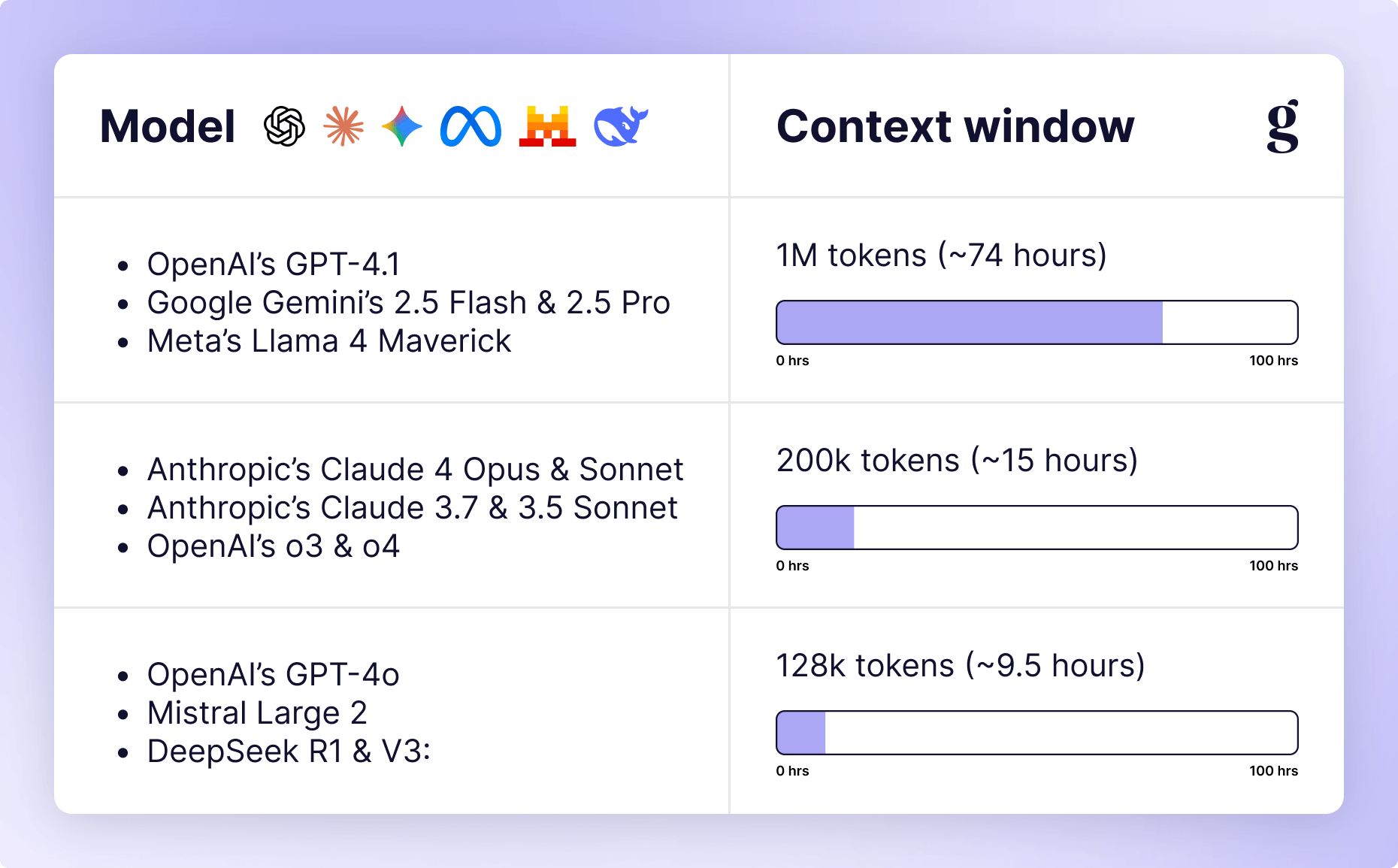
Transcription & summarization
Calling transcription an AI feature at this point feels a bit silly. However, as I learned while writing this very post, there’s a big difference between transcription (which turns what you speak into writing, stammers and all) and summarization (which gets the gist of what you’re trying to say and compiles it into something clear and concise). That difference is crucial for Research, which can easily wind up with 10s of hours of audio and video to parse through.
I’ve been in the industry long enough to remember an era before we recorded sessions at all, relying on human note-takers and transcriptionists. Having AI-powered transcription and summarization baked into every video recording tool is a huge time-saver, and if your insights repository doesn’t have AI features, you can at least take those transcripts and drop them into your LLM of choice to augment your analysis.
Clustering & comparison
Once you have some representation of your raw data (survey responses or interview/usability transcripts) loaded into an LLM, you can start to ask questions of the data using natural language, e.g.
- “What pain points were mentioned most often?”
- “What are the top motivations of power users?”
- “What mental models do new users seem to hold?”
And before you start to worry: while the responses are AI magic, this is very similar to what you’d produce in the traditional affinity mapping exercises when doing your own qualitative analysis. You’ll want to make sure you spot-check it for hallucinations; asking for direct quotes with references can help. Some research tools already have traceability built in. For example, when you query Ask AI in Great Question, every quote is linked to its original transcript so you can jump to the exact moment it occurred and verify accuracy.
On top of that, you can generate cross-tabulations easier than if you had to manually segment data. Want to know how small business users differ from enterprise admins? Or how first-time users differ from daily power users? AI can compare themes across segments and highlight what’s unique and what’s shared.
“AI has massive potential to transform the entire UX research industry. We’re not just talking about quality-of-life features like suggesting titles, we’re talking about synthesizing vast volumes of data in seconds. It’s not a replacement for researchers, but an augmentation: lowering the floor for non-researchers and raising the ceiling for strategic UX researchers.”

Guided analysis
When you’re prepping your analysis, think of AI as an assistant and a sparring partner, similar to how we used AI in the planning phase. Prompt it to challenge your early insights, suggest alternative framings, or identify gaps in evidence. Compare the data you collected to your initial research objectives, using it to frame your narrative, and have AI take the perspective of some of your stakeholders to anticipate how they might react.
Make sure you’re aware of the biases/tendencies of the model you’re using for this, though. If you’re using something like GPT-4o that tends to be overly agreeable, be sure to tell it to be critical.
📣 Knowledge sharing
Perfect study design, flawless execution, and cutting insights are useless if nobody knows about your work or reads your reports. There’s already been a healthy discussion around different ways to “activate” your insights. Now AI is driving a shift in the socialization of research, too.
Chatting with your data
One huge win is to integrate your insights repository with your company’s AI assistant. If you’re using Glean, Guru, Copilot, or other similar AI knowledge management tools, you can train custom GPTs/agents to respond to queries from anyone at the company. Instead of you or one of your colleagues fielding these questions, your stakeholders can “chat” with the data for questions like:
- “What do we know about onboarding pain points for SMB customers?”
- “Has anyone interviewed finance stakeholders in the past year?”
- “How do enterprise vs. free users feel about our marketplace and extensibility?”
While it will never replace having an in-depth conversation with a researcher or first-hand experience with customers, these lightweight, conversational interactions beat reading through an endless array of slide decks, summary reports, or Slack posts. Make sure your AI assistant is trained to provide citations as well in case anyone wants to get back to the original source.
Highlight reels
If you aren’t already creating highlight reels as part of your research practice, you’re missing out. Highlight reels are an excellent way to illustrate the pain points users face in their own words while also avoiding any sampling bias. If a stakeholder watches one interview, they’re more likely to get tunnel vision. If they see a 2-minute clip with 8 different participants all saying similar things, it’s hard to do that.
In an ideal world, your analysis tool can auto-generate these highlight reels for you if you tell it what you’re looking for (e.g. “give me 4 examples of pricing confusion”). But at the very least, using AI during your analysis phase can give you sources with timestamps to vastly decrease the amount of time it takes to produce. AI turns scrubbing through hours of video into one short prompt and a few video edits (or, if you’re lucky, a click of a button 🪄).
With Great Question AI, video highlights (along with summaries, chapters, and tags) are automatically generated after every interview you complete.
Interactive personas
Taking the “chat with your data” part to the next level, some companies are creating their own custom “synthetic personas”. If chatting with your data is about bringing insights to life, synthetic personas are about breathing new life into stodgy old personas. By building archetypes on real research data, your stakeholders can run scenarios past your existing data to anticipate how customers might react.
You might be thinking that this sounds a lot like synthetic users from earlier, and while you’re not completely wrong (both use AI to create a replica of real users), the intended use case is different. When using synthetic users, you’re trying to stress-test your research methodology. Interactive personas are intended to be an easier way for your stakeholders (or other colleagues) to interact with your findings easier and more naturally. Once you have interactive personas, you can try feeding your research plans back into them; however, this creates a risk of generation loss and is not recommended.
Agentic research: MCP and Claude skills
Everything above treats AI as a feature inside a research tool. The bigger shift is AI as a user of your research tools.
Model Context Protocol lets AI assistants like Claude connect directly to your research platform. In practice that means a PM can ask Claude what you learned from the last three onboarding studies and get an answer grounded in your actual repository, with citations, without opening another tab. It also means an agent can set up a study, draft a screener, or pull a participant list as part of a workflow you kick off in plain language.
Great Question shipped the first MCP integration in the research category, and we publish Claude skills for research work weekly, including affinity mapping, discussion guide drafting, and transcript cleanup.
Why this matters for your team, whatever tools you use: the interface for research is moving from dashboards to conversations. Teams whose research is structured, permissioned, and connected will get compounding value from every new model release. Teams whose research lives in scattered decks will get a very confident assistant with nothing to stand on.
Quality, governance, and keeping humans in the loop
Democratizing research with AI works the same way democratizing research always has: lower the floor, raise the ceiling. Make it easy for PMs and designers to get customer input on routine questions, and free your researchers for the strategic work that needs their expertise. AI lowers the floor further than anything before it. That makes the controls more important, not less.
What good governance looks like in an AI-augmented research practice:
- PII and consent. Know what your AI tools do with recordings and transcripts. If a vendor cannot answer where your participant data goes and whether it trains models, that is your answer.
- Review gates. AI-drafted screeners, analyses, and reports get human review before they reach participants or stakeholders. Every time. The cost of review is minutes; the cost of a hallucinated finding reaching your exec team is your team's credibility.
- Method boundaries. Unmoderated tests and routine surveys are fair game for anyone with access. Diary studies, strategic discovery, and sensitive-topic research stay with trained researchers.
- An enablement stance. The research team's job shifts from doing every study to coaching, templates, and quality assurance. As Dropbox's Allison Cole put it about her own team: not a roadblock, an enablement team.
There is an economic argument hiding in here too. As more of the research pipeline gets automated, the quality of the remaining human judgment matters more, not less. Economists call this O-Ring theory: one weak link breaks the chain. The researchers who thrive will not be the ones who resist AI or the ones who trust it blindly. They will be the ones who direct it well.
Get started (without getting overwhelmed)
If all this sounds exciting but overwhelming, that’s completely understandable. Start small, focus on specific tasks, and spend twice as much time working on building context and prompt engineering as you think you need to. It’s taken months for some of these solutions to come to fruition for me, so if your first pass doesn’t work out, don’t get discouraged.
🧰 Want a head start?
Alongside each post in this series we’ll have new downloadable resources like a user research prompt library, deeper tooling analysis, workflow templates, and more.
Coming Soon: More AI x UXR Resources
🧪 Play with LLMs yourself
Caution
If you’re using AI at work, always follow your company’s policies, especially around data privacy and customer PII. You can always practice safely on public examples, mock data, or your own personal accounts.
You don’t need a PhD or permission. Think of chat as a way to iterate on your prompts, but ultimately you should work toward productizing the workflows that fit your needs. When productizing AI, there are two key things to think about:
- What model(s) is best suited for this use case? and
- What intelligent defaults do I need to build into the interaction?
You can use Kaleb Loosbrock’s CRAFTe framework as a great way to structure your experiments. At first it will feel like you’re sinking a lot of time into this, but similar to how Research Operations is a flywheel, eventually you’ll start to build momentum, and the long-term time-savings are unmatched.
“The single best way to improve the results you get from an AI model is to improve your prompt. To address this, I developed the CRAFTe framework, a systematic approach to prompt crafting that ensures the AI has all the necessary information to act as a true, effective partner.”

What to read next
Read the rest of the deep dives on how AI can be used in specific segments of the research workflow, including best practices and currently known limitations.
AI is changing how teams run user interviews, from automated note-taking to AI-moderated sessions.
If you’re curious, skeptical, or just trying to keep up, subscribe to our newsletter below or follow us on LinkedIn. As an industry, we’re all figuring this out as we go, and the best thing we can all do is share what’s working and what’s not. Want to share your own AI experiments or tools? Email me or DM me on LinkedIn: I’d love to chat!
Frequently asked questions
How do I use AI for user experience research?
Start with analysis: run your next round of interview transcripts through AI first-pass analysis and review the output against your own read. It is the lowest-risk entry point with the most obvious time savings. From there, add AI screening and fraud detection to recruiting, then trial AI-moderated interviews on a structured, low-sensitivity topic. Keep human review on everything that reaches participants or stakeholders.
Can AI conduct user interviews without human moderators?
Yes, for structured interviews on well-defined topics. AI moderators follow a discussion guide, probe on answers, and run sessions at any hour without scheduling. They are not appropriate for sensitive subjects or open-ended discovery where rapport and improvisation matter. Most teams use them to add volume alongside human-moderated sessions rather than instead of them. Our AI-moderated interviews guide covers the method in full.
What are the benefits of AI-moderated research?
Scale and speed, mostly. You can run 50 interviews in the time scheduling used to eat for five, across timezones, without a moderator burning out on the fortieth session. Participants sometimes disclose more to an AI moderator on sensitive-adjacent topics because the social pressure is lower. Costs drop because moderation hours stop scaling with session count.
Will AI replace UX researchers?
The evidence so far points the other way: research demand grows as research gets cheaper. When ATMs arrived, bank teller jobs grew, because branches got cheaper to run and banks opened more of them. What changes is the job. Data collection and first-pass analysis stop being where researchers spend their weeks. Judgment about what to study, quality control over what AI produces, and turning findings into decisions become the work.
Do AI research tools protect participant data?
It varies more than it should. Ask any vendor three things: where recordings and transcripts are stored, whether your data trains their models, and what happens to data when a participant revokes consent. If the answers are not immediate and specific, keep looking.