Best panel management software in 2026: 7 tools compared




Everyone that works in ReOps knows the complexity of research recruitment. Matching contacts to user profiles, scheduling interviews, orchestrating incentive programs, etc. It's even worse when you're running multiple research projects simultaneously.
You need dedicated panel management software to do all of the above. But you already know this. You've looked at the panel management software products online, and you're still unsure where to start.
Panel management software does more than store your customer research panel. It's the foundation of your research recruitment. This article covers the features to look for, the factors to weigh, and how seven tools compare on the capabilities ReOps teams ask about most.
Key features of a panel management solution
Choosing your panel management tool is essential to your user research recruitment process. If you don't have the right tool, you won't be able to track duplicates or know whether you've sent email invitations to your research panelists. This leads to over contacting, a biased sample set, and even worse, customers who won't participate in research.
Here are five features you need to manage a research panel successfully:
Integrations
Chances are you already use a bunch of tools to do research, you might have your customer contacts stored on your CRM software. So you want to be able to get these contacts easily uploaded into your panel management tool. You need to ensure that your panel management tool easily integrates with your existing tool stack and that it's easy to bring your data over from other tools. It could be as easy as being able to import via an integration to a platform like Salesforce, importing a CSV or using Zapier to bring in data, but you don't want to be accountable to a support team just to move your customer data from one system to another.
After bringing data over from other tools, it's also important that your panel management platform also integrates with a tool that enables you to host your interviews or surveys. Whether you use Zoom or Microsoft teams, your panel tool should readily offer this integration. No one in ReOps has enough spare time to send Zoom meeting invitations to each research panel member manually.
Even if your panel management tool doesn't integrate with all your current research tools, you should be able to integrate with Zapier. With Great Question, you can integrate your existing tools into our platform with Zaps.
Customizations
There's not a one-size-fits-all approach to research recruitment. So your panel management tool must have customization features. You might not want a participant to participate in a research project more than two times over a six-month period. So you need to be able to set custom eligibility requirements for contacting your respondents.
You also need to ensure that your tool has customization features that enable you to recruit a diverse pool of participants. After pooling and building rich profiles of your customer panel from your screener surveys, you want to be able to set custom filters to shortlist candidates.
Personalization
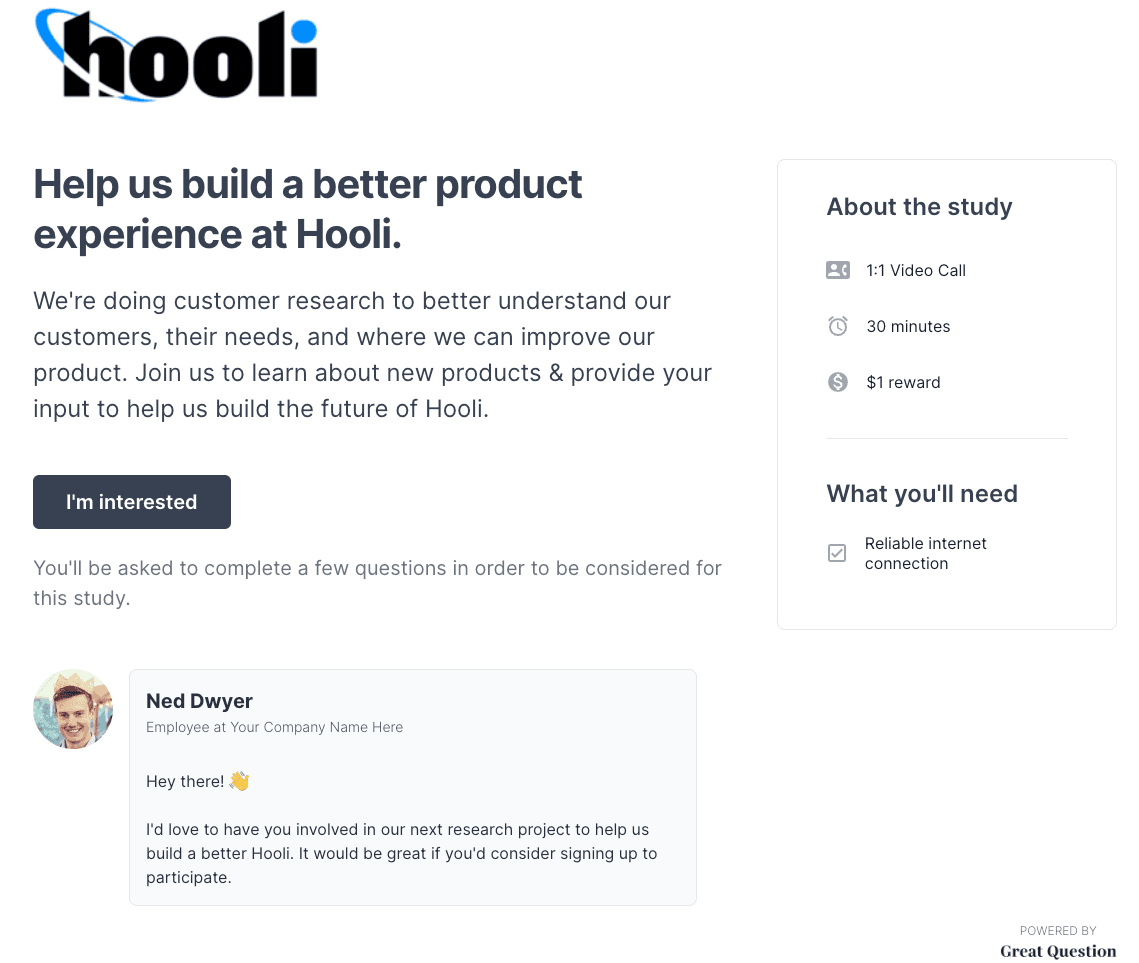
When inviting participants to join your focus group, you don't want to send generic emails for your research survey requests or unbranded brand assets. You need a tool that will give you the ability to customize communications.
With Great Question, you can create branded landing pages in minutes for your whole panel or a specific study. You can also share your newly created branded landing page on social media to get more participants. Also, you can send custom emails to your participants. Customizing emails and adding personalization touches may also increase your response rate.
Automation
Any panel management software solution you choose should offer you the ability to simplify your recruitment workflow with automated features. From screen-to-schedule rules to branded landing pages, there are a few key automations any panel management tool needs:
- Tracking candidate status: See what customers you've invited, who's scheduled, who didn't show, who completed, and who received their incentive all in one screen, no more spreadsheets with multiple status columns.
- One-click invite: Once you filter through your entire candidate database and find the perfect list, you can send off branded emails with just one click.
- Batch scheduling emails: Don't get overbooked and waste your customers' time by inviting everyone all at once. If you just need five respondents, send invites in batches to ensure you ask for feedback from just the right people, saving potential customers for future studies.
- Screen to schedule: Screeners are a great way to ensure you are talking to the right candidate BEFORE you schedule an interview. But, validating a survey response and THEN sending a calendar invite just adds a step in the process. Look for a tool that lets you set up automatic calendar invites for folks that fit your "perfect candidate" criteria.
- Incentive delivery: After conducting your user interviews, you should automatically be able to send panelists their globally accepted research incentives and track the progress of their incentives. Including one-click incentive re-issuance, so everyone feels valued.
Centralization
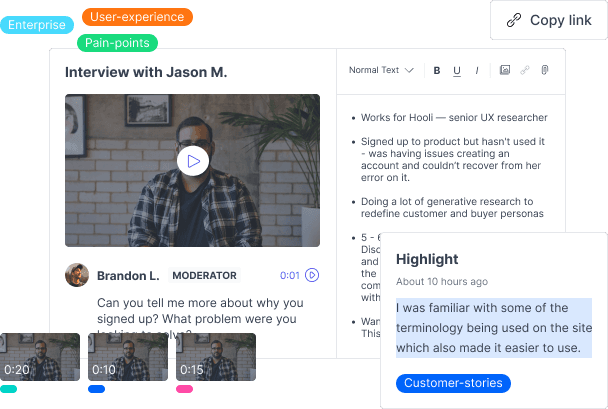
Okay, so you've conducted some successful interviews and handed out your incentives. Now, where do you keep all your research files? You can decide to store your research files on your desktop in individual files, but what if you need to search for something or send a file to a colleague?
What do you do when you want to cross-reference or double-check the participants in your previous study, so you don't include them in a future study? Ideally, your panel tool should have a centralized place where you can find all this information. You need to be able to store all your research findings, re-watch your interviews and view previous communications that have been sent out to users.
Every panel tool should have a research repository where you can find all information relating to your research. With Great Question's research repository, you can create custom tags to organize your research findings and highlight keywords and insights.
Collaboration
You know how the popular saying goes, teamwork makes the dream work. The same applies to customer research. Even if you're a research team of 1, you'll still have to collaborate and share your findings with your colleagues or stakeholders. That's why choosing a tool with collaborative features is essential.
You need to consider a tool that can easily share your research insights with your team. For instance, interactive dashboards where you and other team members can see the number of interviews scheduled for a particular week. Or the ability to share URL links to research interviews with colleagues.
You also want to ensure that your panel tool allows you to add researcher and viewer seats under one plan, so you all have access to the same research data.
Shortlisting: this is great for big teams that want to share a list of potential candidates BEFORE sending an invite. You can build the list, send the shortlist to a colleague, and get their approval.
Factors to consider when choosing your panel management tool
Now that you know what features your panel tool should have, let's talk about the factors to weigh when you choose. A tool can tick every feature box and still be out of budget or hard to use. Here are four factors to consider.
Pricing
Any tool you pick has to fit your research needs and your finance department. Don't automatically go with the cheapest option. Weigh up which features you need, then check which plan includes them: panel features such as contact rules are often on a higher tier than the entry price.
Great Question paid plans start at $129 per seat/month. The self-serve plan includes the research CRM, automated incentives, and candidate eligibility rules. Custom eligibility rules and external CRM sync are on Enterprise, which is priced by module and seat.
Data security
Data security and compliance matter to ReOps because a panel holds your customers' PII data. Ask each vendor for a GDPR data processing agreement and a SOC 2 Type II report, and for a BAA if you will store health data.
Great Question has completed a SOC 2 Type II exam, is built to be GDPR compliant, and hosts data on AWS in the US East region. HIPAA compliance with a signed BAA is an Enterprise add-on, and session recordings and transcripts fall outside that BAA. The details are on the Great Question security page.
Ease of use
You need a platform that is easy to use and navigate and works across all browser types and operating systems. You don't want a tool that requires specific plug-ins to work. It's always a good idea to try before you buy. See if you can request a demo before you commit to using any tool, this will give you a good indication of whether the tool is easy to use.
Also check whether the tool offers a free trial, and ask your team members to sign up for it and give you their opinion.
Great participant experience
Lastly, you want your customers to feel valued and respected throughout the research process. Don't bother them with irrelevant research requests (which you can avoid with the right filtering). Make sure they aren't over-contacted with batch sending & eligibility settings. Make it easy for them to signup and get their research incentives with speedy/automatic responses and find a solution that keeps their data secure.
Panel management software compared (2026)
The table compares seven tools on the capabilities that decide whether a panel stays healthy. Every cell comes from the vendor's own website. Where a vendor doesn't say, the cell reads "Not stated".
Pricing as of September 2026, taken from each vendor's pricing page. UserTesting has owned User Interviews since 7 January 2026; User Interviews still sells its plans on their own.
Tool | Holds your own customers? | Contact-frequency limits | Incentives built in | Study types connected | Starting price |
|---|---|---|---|---|---|
| Great Question | Holds your own customers?Yes: research CRM with a centralized participant panel | Contact-frequency limitsYes: candidate eligibility rules (custom rules on Enterprise) | Incentives built inYes: gift cards, debit cards and charitable donations in 80+ countries | Study types connectedBuilt in: interviews, surveys, unmoderated prototype tests; card sorting, tree testing and focus groups on Enterprise | Starting priceSelf-serve: $129 per seat/month (up to 5 seats) or $1,290 per seat/year. Enterprise: custom pricing |
| User Interviews (Research Hub) | Holds your own customers?Yes: participant CRM on the Research Hub CRM plan | Contact-frequency limitsYes: invite rules and limits (CRM plan) | Incentives built inYes: incentive distribution (3% processing fee when User Interviews pays out) | Study types connectedRuns in your tools: Zoom, Microsoft Teams, Qualtrics, Maze, Lyssna, SurveyMonkey and others | Starting priceContact sales. Workflow starts at 3 seats; CRM starts at 1,000 contacts. Billed annually |
| Ethnio | Holds your own customers?Yes: Ethnio Pool (Enterprise plan) | Contact-frequency limitsYes: cool-down periods and governance rules | Incentives built inYes: any currency or country | Study types connectedScreeners, scheduling, surveys and intercepts; Zoom, Teams, Google Meet, Qualtrics, SurveyMonkey | Starting pricePro: $82 per seat/month, billed annually. Enterprise (includes Pool): custom pricing |
| dscout (Private Panels) | Holds your own customers?Yes: Private Panels | Contact-frequency limitsYes: auto-fatigue settings | Incentives built inYes: incentive management | Study types connecteddscout's own methods: diary studies, interviews, usability tests, surveys, intercepts, AI-moderated studies | Starting priceCustom pricing (Core, Select and Enterprise plans) |
| QuestionPro (Communities) | Holds your own customers?Yes: research communities with built-in panel management | Contact-frequency limitsNot stated | Incentives built inYes: points, badges, cash and donations | Study types connectedQuestionPro surveys and community discussions | Starting priceCommunities is part of Research Suite (10+ users): contact sales |
| Qualtrics (XM Directory) | Holds your own customers?Yes: XM Directory contact database | Contact-frequency limitsYes: contact frequency rules | Incentives built inNot stated | Study types connectedQualtrics surveys and distributions | Starting priceRequest pricing |
| Participant Kit (formerly Consent Kit) | Holds your own customers?Yes: participant CRM and panels | Contact-frequency limitsYes: contact rules to prevent over-contacting | Incentives built inYes: incentive management and tracking | Study types connectedScheduling, screeners, consent forms and NDAs; Calendly and Zapier | Starting priceTeam: $66/month billed annually ($792/year) or $79 month to month, for up to 3 team members and 500 participants |
Great Question
Best for teams that want the panel and the studies in one platform, so eligibility, scheduling and incentives follow each participant from invite to payout. The limitation: custom eligibility rules and external CRM sync need Enterprise, and data is hosted in the US only.
User Interviews (Research Hub)
Best for teams that already run studies in other tools and want a recruiting and panel layer on top, with the option to pull from the User Interviews participant pool. Panel management, invite limits and opt-in forms sit on the CRM plan, and pricing isn't published.
Ethnio
Best for teams that recruit through website and app intercepts and pay incentives across many countries. The Pool, Ethnio's panel feature, is on the Enterprise plan rather than Pro.
dscout (Private Panels)
Best for teams that run diary and field studies and want their own panelists alongside dscout's participant pool. Pricing is custom for every plan, so budget conversations start with a sales call.
QuestionPro (Communities)
Best for market research teams running long-term, survey-led customer communities with points and badges. QuestionPro doesn't describe contact-frequency controls for Communities, so ask about them in the demo.
Qualtrics (XM Directory)
Best for organizations that already run surveys in Qualtrics and want frequency rules across every distribution. XM Directory is a contact database for surveys, so interviews and scheduling happen elsewhere.
Participant Kit (formerly Consent Kit)
Best for smaller ReOps teams focused on consent, participant data governance and EU data residency, with published prices. Plans cap participants (500 on Team, 5,000 on Organisation), and studies run in other tools.
A great panel management tool will lead to better research
Your decision shouldn't be taken lightly: there's a lot to weigh up. Take some time to consider your options. The right tool makes research easier and faster, and it saves you money. If you want your panel and your studies in the same place, try Great Question against your shortlist.
Frequently asked questions
How is a research panel different from a recruitment marketplace?
A research panel is a group of people who opted in to hear from you, usually your customers or users, and whose contact details, consent and participation history you hold. A recruitment marketplace is a vendor's pool of people you have no existing relationship with, paid per session. Use the panel when you need people who know your product, and the marketplace when you need a fresh audience or a segment your customers don't cover.
How much does panel management software cost?
As of September 2026, published entry prices range from $66 a month billed annually (Participant Kit Team) to $82 per seat/month billed annually (Ethnio Pro) and $129 per seat/month (Great Question self-serve). User Interviews Research Hub, dscout, QuestionPro Research Suite and Qualtrics quote custom prices. Check which tier includes panel features such as contact rules: Great Question, Ethnio and User Interviews each put some of them above the entry plan.
How many panelists do you need?
Work backward from your study volume. Multiply the studies you run each month by the participants each one needs, divide by the share of invites that turn into sessions on your own panel, then multiply by how many months your contact rule makes people wait between invites. For example, 4 studies a month with 8 participants each, a 10% invite-to-session rate and a 3-month cool-down gives 32 ÷ 0.1 × 3, or about 960 eligible panelists. Replace each input with your own numbers.
What compliance should panel software have (GDPR, SOC 2, HIPAA)?
At a minimum, ask for a GDPR data processing agreement, consent and deletion handling for panelists, and a current SOC 2 Type II report. If you store health information, you need a signed BAA and a clear list of what it excludes. Also ask where data is hosted if you need EU residency.
Great Question has completed a SOC 2 Type II exam, is built to be GDPR compliant, and hosts data on AWS in the US East region. HIPAA with a BAA is an Enterprise add-on, and recordings and transcripts are processed by third parties outside that BAA. See Great Question security for details.